Our Short List of 3

- Best for: WiFi 6 households and coworking floors that need the fastest extended signal.
- WiFi standard: WiFi 6 (802.11ax), dual-band
- Speeds: up to 2404 Mbps on 5 GHz and 574 Mbps on 2.4 GHz
- Coverage: up to 2400 sq. ft., up to 64 devices
- Ethernet: 1 Gigabit port, access point mode supported

- Best for: Medium homes and offices that want seamless roaming under a single network name.
- WiFi standard: WiFi 6 (802.11ax), dual-band, 4-stream
- Speeds: up to 1.8 Gbps combined (AX1800)
- Coverage: up to 1,500 sq. ft., up to 20 devices
- Security: WPA3

- Best for: Larger spaces on WiFi 5 routers that still want mesh-style roaming.
- WiFi standard: WiFi 5 (802.11ac), dual-band
- Speeds: up to 1750 Mbps combined (AC1750)
- Coverage: up to 2,100 sq. ft., up to 35 devices
- Ethernet: 1 Gigabit port
All 4 Picks at a Glance
| Product | Specs | Action |
|---|---|---|
| TP-Link AX3000 WiFi 6 Range Extender (RE715X) |
| Check price on Amazon |
| NETGEAR WiFi 6 Mesh Range Extender (EAX15) |
| Check price on Amazon |
| NETGEAR WiFi Mesh Range Extender (EX6250) |
| Check price on Amazon |
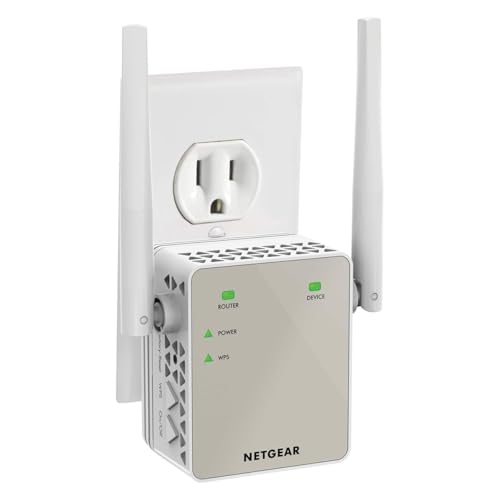 NETGEAR WiFi Range Extender (EX6120) |
| Check price on Amazon |
Key takeaways
- Compare the best wireless network extenders for coworking spaces and homes, from WiFi 6 flagships to simple plug-in boosters that end dead zones.
A wireless network extender solves one specific problem: your router is fine, but its signal dies before it reaches the room where you actually work. The real decision is not whether to extend your network, but how much speed, coverage, and roaming polish you need in the weak corner, because a cheap plug-in unit and a WiFi 6 mesh extender behave very differently once calls, uploads, and a dozen devices compete for the same rebroadcast signal.
This guide is for coworking members, home workers, and small office teams whose desks sit beyond comfortable router range. Every pick below is a true range extender, repeater, or signal booster sold as an extender, chosen from the names and specifications printed on its Amazon product page, with plug-in designs that need no new cabling and no change of internet plan.
Quick Picks
As an Amazon Associate we earn from qualifying purchases.
| Product | Best for | Key spec from title |
|---|---|---|
| TP-Link AX3000 WiFi 6 Range Extender (RE715X) | WiFi 6 routers and busy shared desks | AX3000 dual-band, up to 2400 sq. ft., 64 devices |
| NETGEAR WiFi 6 Mesh Range Extender (EAX15) | Keeping one network name while roaming | AX1800 dual-band, up to 1,500 sq. ft., 20 devices |
| NETGEAR WiFi Mesh Range Extender (EX6250) | Larger floors on WiFi 5 routers | AC1750 dual-band, up to 2,100 sq. ft., 35 devices |
| NETGEAR WiFi Range Extender (EX6120) | One stubborn dead room on a budget | AC1200 dual-band, up to 1,500 sq. ft., 25 devices |
How to Choose
Match the WiFi Generation to Your Router
An extender cannot broadcast a newer standard than the router feeding it, so pairing comes first. If your router runs WiFi 6, a WiFi 6 extender such as the RE715X or EAX15 keeps features like OFDMA working across the hop, which helps when many devices share the extended signal. With an older WiFi 5 router, an AC1750 or AC1200 extender is a sensible match and you give up little in practice. Check the router label or its admin page for the standard it uses before ordering, because mismatched generations still connect, yet the faster unit simply falls back to the older protocol.
Read Coverage and Device Counts as Ceilings
The coverage figure on an extender listing is a best-case open-space number, and the device count is a connection ceiling rather than a promise of full speed for everyone. A rating of up to 2,400 square feet suits a wide coworking floor or a two-storey house, while a 1,500 square foot unit is aimed at one or two weak rooms. Count the devices that will realistically sit in the extended zone, including phones, laptops, printers, and smart plugs, and leave headroom above that number so the extender is not saturated during the busiest hour of the day.
Decide Between One Network Name and a Separate One
Classic extenders rebroadcast under a second network name, often the router name plus an extension suffix, which means phones may cling to the weak original signal instead of switching. Mesh-style extenders with smart roaming keep a single network name and steer devices between router and extender automatically, a smoother fit for people who move around with a laptop during calls. Decide which behaviour you prefer before buying, since it is a design difference rather than a setting you can always change later, and it shapes everyday use more than raw speed figures do.
Check the Ethernet Port and Placement Options
A wired port on an extender gives a fixed device, such as a desktop, printer, or TV box, a steadier link than wireless rebroadcast, and some models can also run in access point mode when a network cable is available. Port speed matters: a gigabit port suits fast plans, while a 10/100 port caps wired throughput at older rates. Placement matters just as much. Every plug-in extender needs an outlet roughly halfway between router and dead zone, still inside solid router coverage, so survey your outlets before assuming a compact wall-plug design will sit where it needs to.
The 4 Best Options
TP-Link AX3000 WiFi 6 Range Extender (RE715X)
- Best for: WiFi 6 households and coworking floors that need the fastest extended signal.
- WiFi standard: WiFi 6 (802.11ax), dual-band
- Speeds: up to 2404 Mbps on 5 GHz and 574 Mbps on 2.4 GHz
- Coverage: up to 2400 sq. ft., up to 64 devices
- Ethernet: 1 Gigabit port, access point mode supported
WiFi 6 households and coworking floors that need the fastest extended signal.
EasyMesh roaming needs an EasyMesh-compatible router; with other routers it works as a standard extender.
The RE715X is the strongest all-round pick here for spaces already running a WiFi 6 router. Its AX3000 rating splits into a fast 5 GHz band for calls and large uploads plus a 2.4 GHz band for range, and the listing’s coverage figure targets bigger floors rather than a single room. Two external antennas and beamforming aim the signal toward your devices, while EasyMesh support lets it join a compatible mesh setup instead of acting as a lone repeater. It suits shared desks and meeting corners where several people lean on the extended signal at once.
NETGEAR WiFi 6 Mesh Range Extender (EAX15)
- Best for: Medium homes and offices that want seamless roaming under a single network name.
- WiFi standard: WiFi 6 (802.11ax), dual-band, 4-stream
- Speeds: up to 1.8 Gbps combined (AX1800)
- Coverage: up to 1,500 sq. ft., up to 20 devices
- Security: WPA3
Medium homes and offices that want seamless roaming under a single network name.
The 20-device ceiling is the lowest here, so count the devices in the extended zone before choosing it.
The EAX15 is built for people who hate juggling two network names. As a mesh extender it keeps one network name across router and extender, so a laptop carried from a desk to a breakout area stays on the stronger signal without a manual switch. Its AX1800 WiFi 6 rating is a step below the RE715X on paper, yet it still covers the everyday mix of video calls, cloud documents, and streaming in a medium-sized space. WPA3 support adds current security, and the wall-plug body keeps it off desks and shelves entirely.
NETGEAR WiFi Mesh Range Extender (EX6250)
- Best for: Larger spaces on WiFi 5 routers that still want mesh-style roaming.
- WiFi standard: WiFi 5 (802.11ac), dual-band
- Speeds: up to 1750 Mbps combined (AC1750)
- Coverage: up to 2,100 sq. ft., up to 35 devices
- Ethernet: 1 Gigabit port
Larger spaces on WiFi 5 routers that still want mesh-style roaming.
It cannot add WiFi 6 features to a network, so future router upgrades may leave it as the slowest link.
The EX6250 is the WiFi 5 workhorse of this group, aimed at larger floors still running an AC router. Its AC1750 rating and coverage of up to 2,100 square feet reach further than the smaller plug-ins, and mesh smart roaming keeps a single network name as you move. FastLane technology can dedicate one band to the router link and the other to your devices, which protects speed on the rebroadcast hop. A gigabit Ethernet port gives a fixed desk or media box a wired option. It fits bigger homes and shared offices that do not plan a router upgrade soon.
NETGEAR WiFi Range Extender (EX6120)
- Best for: A single dead room that needs a basic, inexpensive-style plug-in boost.
- WiFi standard: WiFi 5 (802.11ac), dual-band
- Speeds: up to 1200 Mbps combined (AC1200)
- Coverage: up to 1,500 sq. ft., up to 25 devices
- Ethernet: 1 port, 10/100 Mbps
A single dead room that needs a basic, inexpensive-style plug-in boost.
The Ethernet port is 10/100 rather than gigabit, so wired devices are capped well below the wireless rating.
The EX6120 is the simple fix for one room where the signal fades: a back bedroom, a garage desk, or a small office at the end of a corridor. Its AC1200 dual-band rating is modest, but it is honestly matched to browsing, calls, and HD streaming for a handful of devices rather than a whole floor. The compact wall-plug body disappears into an outlet, setup runs through WPS or a browser, and the single Ethernet port can wire up one nearby device such as a printer or an older desktop that lacks WiFi entirely.
Which One Fits Your Situation
Your Desk Sits in a Dead Corner of a Shared Office
Pick the RE715X if the office router runs WiFi 6, because its wider coverage and higher device ceiling handle a cluster of desks rather than one seat. Place it at the edge of reliable router coverage, not inside the dead zone itself, and let its antennas serve the desks beyond. For a WiFi 5 office router, the EX6250 covers the same ground with matching technology.
You Move Around During Calls
Choose the EAX15 or the EX6250, since both keep one network name and steer your laptop as you walk between rooms. The EAX15 suits WiFi 6 routers and medium spaces, while the EX6250 reaches further on WiFi 5. A classic extender with a separate network name can leave a phone clinging to a fading signal mid-call, which is exactly the frustration roaming support removes.
One Back Room Loses Signal at Night
The EX6120 is enough when a single bedroom or study drops off the network while the rest of the home is fine. Its job is a short, simple hop: plug it into a hallway outlet with a clear path to the router, connect the room’s few devices, and leave it alone. Spending more on coverage you will never use adds nothing here.
You Also Need a Wired Connection Far From the Router
Look at the RE715X or EX6250, whose gigabit ports can feed a desktop, console, or TV box at a desk far from the router. Wiring the fixed device frees wireless capacity for phones and laptops, and the extender’s port speed will not bottleneck a fast plan. Avoid relying on the EX6120 for this job, because its port is limited to 10/100 speeds.
Common Mistakes
- Placing the extender inside the dead zone itself, where it has only a weak router signal to rebroadcast.
- Expecting an extender to raise your internet plan speed; it only redistributes the connection you already have.
- Buying a WiFi 6 extender for top performance while keeping a WiFi 5 router that cannot feed it at that standard.
- Forgetting that a dual-band extender shares its bands between receiving and rebroadcasting, so real throughput in the extended zone is lower than the box rating.
- Covering a very large or multi-floor space with one small plug-in unit instead of planning extender placement around outlets with solid router signal.
Frequently Asked Questions
Will a wireless network extender work with my existing router?
In most cases, yes. Every extender in this guide is listed as working with any standard WiFi router, gateway, or cable modem with WiFi, regardless of brand. Brand-specific extras are the exception: features such as EasyMesh roaming or a single shared network name may need a compatible router from the same ecosystem, while basic repeating works across brands.
Where should I place an extender for the best result?
Place it roughly halfway between the router and the weak area, in a spot that still receives a strong router signal. An extender can only rebroadcast what it receives, so a unit plugged into a true dead zone repeats a poor connection. Use the signal indicator or setup app during installation, and try a neighbouring outlet if speeds disappoint.
Does an extender create a separate network name?
It depends on the model. Classic extenders often broadcast a second name, typically your network name with an extension suffix, and devices may not switch automatically. Mesh-style extenders such as the EAX15 and EX6250 keep one network name and support smart roaming, so phones and laptops move between router and extender without manual switching or dropped calls.
Can an extender replace a mesh WiFi system?
For one or two weak rooms, an extender is usually the simpler and cheaper answer, and mesh-capable extenders narrow the gap further. A full mesh system still suits very large homes or offices with several problem areas, because its multiple nodes are designed to work as one coordinated network. Start with a single extender when the problem area is small and well defined.