Our Short List of 3
All 4 Picks at a Glance
| Product | Specs | Action |
|---|---|---|
 Creative Sound BlasterX G6 | Check price on Amazon | |
 Creative Sound Blaster Z SE | Check price on Amazon | |
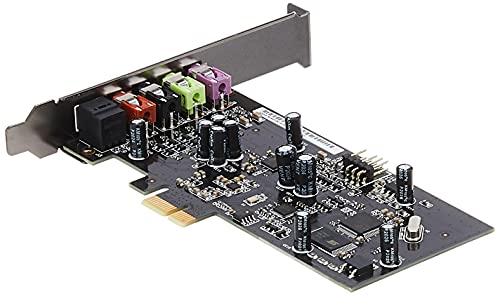 ASUS Xonar SE | Check price on Amazon | |
 Creative Sound Blaster Play! 3 | Check price on Amazon |
Key takeaways
- Find the best sound cards for Ventrilo and Windows 10 for clear voice chat, low latency, and reliable drivers for gaming, team talk, and everyday calls.
Ventrilo has been around for a long time, and plenty of gaming groups still use it for team voice chat. It is a simple program with a simple job: carry your voice to your teammates clearly and without delay. The catch is that Ventrilo can only work with the audio hardware Windows gives it. If your onboard audio hisses, clips your microphone, or drops out at the worst moment, no setting inside Ventrilo will fix that. A dedicated sound card replaces that weak link with cleaner input, cleaner output, and drivers that are actually maintained for Windows 10.
This guide covers four sound cards that fit the job. Two are internal PCIe cards for desktops, and two are external USB devices that work with desktops and laptops alike. Every pick has a confirmed Windows 10 driver path, a proper microphone input, and a headphone amplifier strong enough for a real gaming headset. The focus throughout is voice quality first, because in Ventrilo your teammates hear your microphone far more than they hear your game audio.
As an Amazon Associate, we earn from qualifying purchases.
Quick Answer
The Creative Sound BlasterX G6 is the best overall pick for Ventrilo on Windows 10, with a clean microphone input, sidetone monitoring, and a strong headphone amplifier. The Sound Blaster Z SE is the best internal card, the ASUS Xonar SE is the best value pick, and the Sound Blaster Play! 3 is the easiest fix.
How to Choose
Start with the form factor. An internal PCIe card suits a desktop that stays in one place and has a free PCIe x1 slot. It draws power from the slot and stays out of the way. An external USB sound card suits a laptop, a shared machine, or anyone who wants to move the device between computers, and it is easier to install since there is no need to open the case. For Ventrilo, either form factor works, because Ventrilo simply talks to the default Windows recording and playback devices. Choose the form factor that matches your machine.
Microphone quality matters more than anything else for voice chat. Look for a dedicated microphone input with a clean analog stage, and check whether the card supports microphone monitoring, often called sidetone. Sidetone lets you hear your own voice in your headphones at a low level, which stops you from shouting or mumbling without realizing it. If a card only offers a combined headset jack, confirm it accepts your headset plug.
Driver support for Windows 10 is the next thing to confirm. Ventrilo relies on the standard Windows audio path, so the card must have stable Windows 10 drivers from the manufacturer. The picks in this guide were chosen partly for that reason. Avoid cards whose driver downloads stop at older Windows versions, and avoid secondhand cards with no support page. A card that Windows 10 cannot recognize is useless no matter how good its specifications look.
Headphone amplification is easy to overlook and hard to live without. Some headsets need more power to reach a comfortable volume without distortion, and a card rated for higher impedance headphones will drive almost any headset cleanly. Latency matters little here, since Ventrilo itself adds very little delay, but keep software effects modest while playing. Surround modes and ultra-high sample rates add little to voice chat. Buy for the microphone, the drivers, and the headphone amplifier, and treat the rest as a bonus.
Creative Sound BlasterX G6
The Sound BlasterX G6 is the best overall sound card for Ventrilo on Windows 10 because it gets every voice-chat fundamental right in one external USB device. It connects over USB, so it works with desktops and laptops, and it needs no free PCIe slot and no case surgery. The microphone input is clean, the sidetone control sits on the device itself, and the headphone amplifier is strong enough for demanding headsets. For a Ventrilo user, that means teammates hear a clear voice, you hear yourself at a natural level, and setup takes minutes.
The G6 is built around a high-resolution DAC with 130 dB of dynamic range and playback up to 32-bit and 384 kHz, far more resolution than voice chat needs but a clean, detailed sound for music and games. The Xamp discrete headphone amplifier drives high-impedance headphones without strain, and the virtual 7.1 surround mode can widen game audio when you want it. The G6 also carries optical digital input and output, plus a line input. Volume, sidetone, and profile switching are all reachable on the device without opening software, which matters during a game. The one real trade-off is that it is an external box on your desk rather than a hidden internal card, and it costs more than a basic USB adapter.
Creative Sound Blaster Z SE
The Sound Blaster Z SE is the best internal PCIe sound card for Ventrilo on Windows 10. It installs into a PCIe x1 slot, draws power from the slot, and then disappears inside the case, leaving your desk free of extra boxes and cables. The card is built around the Sound Core3D audio processor, with playback up to 24-bit and 192 kHz and a signal-to-noise ratio of 116 dB. For voice chat, the important features are the microphone equalizer, the ASIO support for low-latency audio, and the headphone amplifier that drives headphones up to 600 ohms.
What makes the Z SE a good Ventrilo card is the microphone path. The card includes microphone equalizer presets that clean up the voice signal before it reaches Ventrilo, which helps if your microphone is thin or boomy. ASIO support keeps latency low for recording, and the discrete 5.1 output plus virtual 7.1 for headphones covers games and movies. The card ships with a shielded design that keeps electrical noise from inside the case out of the audio path, a real concern for internal cards in busy gaming PCs.
Installation is straightforward on any desktop with a free PCIe x1 slot: seat the card, connect your headset and microphone, and install the Creative driver and control panel for Windows 10. Once set, the card stays configured, and Ventrilo simply uses the Windows default devices. The main limitation is that it is desktop-only, so laptop users should look at the USB picks in this guide instead. For a desktop that hosts your Ventrilo sessions night after night, the Z SE is a fit-and-forget upgrade that fixes the weakest part of most onboard audio: the microphone input.
ASUS Xonar SE
The ASUS Xonar SE is the best value internal sound card for Ventrilo on Windows 10. It is a PCIe x1 card with 5.1-channel output, playback up to 24-bit and 192 kHz, and a 116 dB signal-to-noise ratio, built around a Realtek audio codec with a C-Media controller. The listing states Windows 10 compatibility directly, which is exactly what a Ventrilo user needs to see before buying. The card includes a low-profile bracket in the box, so it fits slim desktops as well as full-size towers.
For voice chat, the Xonar SE covers the essentials without fuss. The microphone input feeds a clean recording path into Windows, and the 300-ohm headphone amplifier drives most gaming headsets with volume to spare. The Xonar Audio Center software provides equalizer settings and output controls, and the card includes an optical S/PDIF output. For Ventrilo the card behaves like any other Windows audio device: set it as the default, set your levels, and talk.
The appeal here is simplicity and cost. There is no external box, no extra power cable, and no USB port used. Installation takes a few minutes on a desktop with a free PCIe x1 slot, and the driver package from ASUS covers Windows 10. The trade-offs are modest: the microphone processing is simpler than the equalizer suite on the Sound Blaster Z SE, and there is no sidetone knob on the card itself, so monitoring depends on Windows settings or the ASUS software. If your goal is to replace noisy onboard audio with a clean, stable, properly supported card at the lowest sensible cost, the Xonar SE is the pick that does it.
Creative Sound Blaster Play! 3
The Creative Sound Blaster Play! 3 is the easiest sound card for Ventrilo on Windows 10. It is a small USB adapter that plugs into a USB port and gives you a headphone jack and a microphone jack, with no drivers to install and no case to open. That plug-and-play design makes it the right pick for a laptop, a shared family computer, or a desktop whose onboard audio has failed. It upgrades playback to 24-bit and 96 kHz and improves microphone recording to 24-bit and 48 kHz, a clear step up from the noisy audio jacks built into many motherboards and laptops.
The Play! 3 is particularly friendly to headsets. It accepts a single combined headphone-and-microphone plug or separate headphone and microphone plugs without a Y-splitter, so almost any gaming headset connects directly. That matters for Ventrilo because a clean microphone connection with no adapter in the chain is one less source of hum and crackle. The adapter is small enough to leave plugged in permanently, and it needs no software at all for basic voice chat.
There are limits to be honest about. The Play! 3 is a stereo device, so it offers no surround modes, and its headphone amplifier is modest compared with the G6 or the Z SE. It will drive typical gaming headsets well, but it is not the pick for very demanding headphones. It also has no physical volume or sidetone controls, so level adjustments happen in Windows or in software. If your onboard audio is noisy, your laptop has only one audio jack, or you want the cheapest reliable fix that simply works, the Play! 3 is the sensible choice.
Who Should Skip It
Not everyone needs a dedicated sound card for Ventrilo, and it is worth saying so plainly. If your current onboard audio already gives you a clean microphone signal with no hum, no crackle, and no dropouts, and your teammates say you sound fine, a new card will change very little. Ventrilo voice is narrowband by design, so a better DAC will not make your voice dramatically clearer to other people once the signal is already clean. Spend the money only if you have a real problem to solve: noise, low microphone volume, a broken audio jack, or a headset your onboard audio cannot drive.
Laptop users should skip the internal PCIe cards in this guide, since a laptop has no PCIe slot for them. Desktop users with no free PCIe slot face the same limit and should choose USB as well. Anyone who mainly uses a USB headset with its own built-in sound processing should also pause: a USB headset already bypasses the sound card entirely, so a new card would sit unused. In that case, the fix for poor voice quality is a better headset or microphone, not a sound card. Finally, skip any card whose Windows 10 drivers you cannot confirm before buying.
FAQ
Does Ventrilo work with any sound card on Windows 10?
Yes. Ventrilo uses the standard Windows audio devices for input and output, so any sound card with working Windows 10 drivers will work with it. Set the card as the default recording and playback device in Windows sound settings, then select the same devices inside Ventrilo. If the microphone level moves when you speak, Ventrilo will carry your voice. The card matters for clarity, not for basic compatibility.
Do I need a PCIe card or a USB sound card for Ventrilo?
Either one works, so choose based on your computer. A PCIe card suits a desktop with a free slot and stays hidden inside the case, while a USB sound card suits a laptop or any machine you do not want to open. For voice chat there is no meaningful quality gap between the two forms. Pick USB for simple installation or portability, and pick PCIe for a permanent internal upgrade.
What is sidetone, and why does it help in Ventrilo?
Sidetone is microphone monitoring: a small amount of your own voice fed back into your headphones while you talk. It tells you how loud you are and whether your microphone is working, without needing to ask your teammates. Without sidetone, people tend to shout into the microphone or speak too quietly without noticing. The Sound BlasterX G6 has a physical sidetone control, which is one reason it leads this guide.
How do I set up a new sound card for Ventrilo on Windows 10?
Install the card, then install the manufacturer driver package for Windows 10 if the card needs one. Open Windows sound settings, set the new card as the default playback device and its microphone input as the default recording device, and speak to check that the input level moves. In Ventrilo, open the setup window, choose the same devices, set your push-to-talk key, and run a short voice check with a teammate.
Final Verdict
The best sound card for Ventrilo on Windows 10 depends on your machine, but the shortlist is simple. The Creative Sound BlasterX G6 is the best overall pick: a USB device with a clean microphone input, sidetone control, and a strong headphone amplifier that works on desktops and laptops alike. The Creative Sound Blaster Z SE is the best internal card for a desktop, with microphone equalization, low-latency ASIO support, and an amplifier that drives demanding headphones. The ASUS Xonar SE is the best value internal card, offering clean Windows 10 audio and a solid headphone amplifier at a modest cost. The Creative Sound Blaster Play! 3 is the easiest fix of all, a plug-and-play USB adapter that rescues noisy onboard audio in minutes.
Whichever you choose, set it up properly: install the Windows 10 drivers, set the card as the default device, check your microphone level, and run a short voice check with a teammate before your next session. Ventrilo rewards a clean, stable audio path more than any single feature. Pick the form factor that fits your computer, buy for the microphone and the drivers, and your team will hear the difference from the first call.
Product and ASIN Reference
| Product | ASIN |
|---|---|
| Creative Sound BlasterX G6 | B07FY45F2S |
| Creative Sound Blaster Z SE | B08HYPH5T6 |
| ASUS Xonar SE | B07HCX1NY9 |
| Creative Sound Blaster Play! 3 | B06XBZ38ZJ |