Key takeaways
- Compare the best laptop cooling pads for desks and home offices, from slim three-fan designs to RGB gaming pads and lap-friendly mats that keep air moving.
A laptop that runs hot can slow down, grow loud, and feel uncomfortable to type on, especially during long work sessions or gaming marathons. A cooling pad lifts the machine off the desk, pushes fresh air toward its vents, and gives your wrists a more comfortable angle at the same time. The right pad depends on the size of your laptop, where its vents sit, and whether the pad will stay on a desk or travel with you.
The five pads below cover the most common needs: a slim three-fan pad for everyday laptops, a four-fan pad for larger machines, a big-fan pad with adjustable height, an RGB pad for gaming setups, and a soft lap-friendly mat for couch and bed use.
As an Amazon Associate, we earn from qualifying purchases.
How to Choose a Laptop Cooling Pad
Match the pad to your laptop size. A pad rated for laptops up to 17 inches will hold a 13-inch machine, but the fans may sit far from its vents. Check the pad’s supported size range against your laptop’s screen size, and look at the pad’s surface dimensions so the laptop does not overhang the edges.
Line the fans up with your vents. Most laptops draw air from underneath and exhaust it from the sides or the rear. A pad with several smaller fans spread across the surface covers more vent positions, while a single large fan concentrates airflow in the middle.
Think about height and wrist angle. Many pads raise the rear of the laptop by a few inches, which tilts the keyboard toward you and can ease wrist strain during long typing sessions. Adjustable-height pads let you try different angles until you find one that feels right.
Check USB power and pass-through ports. Cooling pads draw power from a USB port on your laptop, so a pad with only one USB cable can leave you short of ports. Some pads include an extra USB port on the side, which passes power through to a mouse or a flash drive.
Havit HV-F2056 Laptop Cooling Pad

The Havit HV-F2056 is a slim, portable pad built around three quiet fans, and it is one of the most widely used cooling pads for laptops between 15.6 and 17 inches. Its low profile keeps the keyboard close to desk height, which suits typists who dislike a steep tilt, and the two built-in USB ports mean you lose no connectivity when the pad is plugged in.
Three fans spread across the surface move air toward the underside of the laptop, and the mesh top lets that air reach the intake vents instead of bouncing off a solid plate. The blue LED glow is subtle enough for an office desk, and the pad’s slim body slips into a laptop bag without adding much bulk, which makes it a reasonable choice for people who move between a home office and a shared workspace.
One thing to note is that the HV-F2056 is a flat pad without a built-in height adjustment, so the typing angle stays close to level. Anyone who wants a raised keyboard may prefer a pad with adjustable feet. For a straightforward, quiet pad that simply keeps air moving under a mid-size or large laptop, the Havit is a dependable starting point.
| Spec | Detail |
|---|---|
| Brand | havit |
| Model | HV-F2056 |
| ASIN | B00NNMB3KS |
| Fans | 3 |
| Laptop size | 15.6 to 17 inches |
| USB ports | 2 |
| Color | Black and blue |
KLIM Wind Laptop Cooling Pad

The KLIM Wind is a four-fan pad aimed at laptops from 11 to 17 inches, and its four fans spin at 1200 RPM to push air across a wide area of the laptop base. That spread-out layout is useful when a laptop’s vents sit in different places, because the airflow is not limited to a single central zone. The pad stays slim and light, so it works on a desk and inside a bag.
Two rear legs lift the back of the pad to a comfortable typing slope, while small pegs at the front keep the laptop from sliding forward. A USB pass-through port on the side helps when the laptop’s own ports are already in use, and the pad’s simple control layout keeps the setup free of extra software or drivers. KLIM backs the Wind with a five-year warranty, which is longer than most pads in this group offer.
The Wind is a good fit for anyone whose laptop runs warm under a full workload and who wants broad, even airflow rather than a single strong jet. It is not the flashiest pad here, and it has no lighting effects, so gamers who want RGB glow should look at the KLIM Ultimate instead.
| Spec | Detail |
|---|---|
| Brand | KLIM |
| Model | Wind |
| ASIN | B01MRWE5AX |
| Fans | 4 at 1200 RPM |
| Laptop size | 11 to 17 inches |
| USB pass-through | Yes |
| Warranty | 5 years |
Cooler Master NotePal X3 Laptop Cooling Pad

The Cooler Master NotePal X3 takes a different approach: one oversized 200mm fan with a blue LED, a dial to control fan speed, and a vented surface that also directs air toward the hands. It supports laptops up to 17 inches and measures about 15.7 by 12.2 inches, so it suits larger machines that need a wide, stable base.
The fan speed dial is the X3’s most useful feature. Turn it down for quiet work such as writing or browsing, and turn it up when the laptop is under a heavy load. The dial gives you direct control without any software, and the large fan moves a broad column of air at lower speeds than a cluster of small fans needs to reach. Adjustable height settings let you raise the rear of the pad for a better typing angle.
The X3 is thicker and heavier than the slim pads in this guide, so it is better suited to a fixed desk than to a bag. It also uses a single USB connection for power, with no pass-through port listed, so plan your ports accordingly.
| Spec | Detail |
|---|---|
| Brand | Cooler Master |
| Model | R9-NBC-NPX3-GP |
| ASIN | B0079T2KHG |
| Fans | 1 x 200mm with blue LED |
| Laptop size | Up to 17 inches |
| Fan control | Speed dial |
| Dimensions | 15.7 x 12.2 x 2.8 inches |
KLIM Ultimate RGB Laptop Cooling Pad

The KLIM Ultimate adds color to the cooling pad category with an RGB LED rim that runs around the edge of the pad, giving a gaming desk a finished look without adding extra hardware. It supports laptops up to 17 inches and runs from a single USB connection, so setup is as simple as plugging it in and placing the laptop on top.
Beneath the mesh surface, a fan array pushes air toward the laptop’s underside, and the pad’s wide surface gives larger gaming laptops room to sit without overhanging the edges. The LED rim can be set to suit the rest of a desk setup, which makes the Ultimate a natural match for RGB keyboards, mice, and monitors. The pad is stable under a heavy laptop, and its low profile keeps the keyboard at a comfortable height for long sessions.
As with most RGB pads, the lighting is the main reason to choose the Ultimate over the plain KLIM Wind. If you do not care about lighting, the Wind offers similar airflow in a simpler package. But for a gaming setup where the desk’s look matters as much as its airflow, the Ultimate delivers both in one unit.
| Spec | Detail |
|---|---|
| Brand | KLIM |
| Model | Ultimate |
| ASIN | B07NNQXTQT |
| Laptop size | Up to 17 inches |
| Lighting | RGB LED rim |
| Power | USB powered |
| Surface | Mesh |
Targus Lap Chill Mat AWE55US
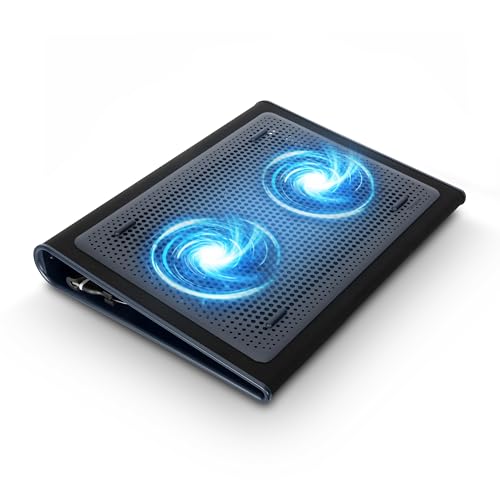
The Targus Lap Chill Mat AWE55US is the most portable pad in this guide, built for people who use a laptop on their lap as often as on a desk. Its soft neoprene base cushions the legs, blocks heat from reaching them, and keeps the laptop steady on a couch, a bed, or an armchair. Two fans draw power from a USB-A connection and disperse heat from the laptop’s underside.
Because the mat is soft and flexible rather than rigid, it conforms to the lap instead of digging in, which makes long sessions more comfortable. It fits laptops up to 17 inches, and its compact footprint means it travels well in a bag alongside the laptop itself. The neoprene surface also gives the laptop grip, so it is less likely to slide when you shift position.
The trade-off is airflow: two small fans and a soft surface move less air than the rigid, multi-fan pads in this guide, so the Chill Mat is best for light to moderate workloads rather than heavy gaming or video work.
| Spec | Detail |
|---|---|
| Brand | Targus |
| Model | AWE55US |
| ASIN | B002NU5O9C |
| Fans | 2 |
| Laptop size | Up to 17 inches |
| Surface | Soft neoprene |
| Connection | USB-A |
| Dimensions | 30.5 x 38.4 x 5.6 cm |
Who Should Buy Which Pad
If you want one pad for a desk and a bag, the Havit HV-F2056 is the simplest pick: slim, quiet, and wide enough for most laptops. If your laptop runs warm across its whole base, the KLIM Wind’s four-fan layout covers more vent positions. Large gaming laptops belong on the Cooler Master NotePal X3 or the KLIM Ultimate, with the X3 winning on raw airflow control and the Ultimate winning on looks. And if your laptop spends most of its time on your lap, the Targus Lap Chill Mat is the only pad here built for that job.
Frequently Asked Questions
Do laptop cooling pads really help?
A cooling pad lifts the laptop off the desk and pushes fresh air toward its underside, which helps the laptop’s own fans work with cooler intake air. The effect is most noticeable on laptops that run warm under load, and a pad also keeps the keyboard and wrist area more comfortable during long sessions.
How do I know which size cooling pad to buy?
Match the pad’s supported laptop size to your screen size, and check the pad’s surface dimensions so your laptop does not overhang the edges. A pad rated for up to 17 inches will hold a smaller laptop, but its fans may sit far from the vents, so a closer size match usually cools better.
Are cooling pads noisy?
Most modern pads use quiet fans, and many include a speed control so you can turn the fans down during calls or focused work. Single large fans tend to run quieter at the same airflow than several small fans spinning fast, so check the fan size and whether the pad has a speed dial.
Can I use a cooling pad on my lap?
Yes, but choose a pad designed for it, such as the Targus Lap Chill Mat, which has a soft base that cushions your legs. Rigid pads with hard edges can dig in and feel uncomfortable, and a pad with exposed fan grilles on the underside may block airflow when it rests on soft fabric.
Product and ASIN Reference
| Product | ASIN |
|---|---|
| Havit HV-F2056 Laptop Cooling Pad | B00NNMB3KS |
| KLIM Wind Laptop Cooling Pad | B01MRWE5AX |
| Cooler Master NotePal X3 Laptop Cooling Pad | B0079T2KHG |
| KLIM Ultimate RGB Laptop Cooling Pad | B07NNQXTQT |
| Targus Lap Chill Mat AWE55US | B002NU5O9C |