Key takeaways
- Compare the best docking stations for home offices and hot desks, covering dual and triple displays, charging wattage, ports and laptop setup tips.
A good docking station turns a laptop into a proper desk setup with one cable. Monitors, keyboard, mouse, wired network and charging stay connected at the desk, so arriving at a home office or a shared hot desk means plugging in once instead of rebuilding the workstation every morning. The five docks here cover a dual-monitor desk, a triple-display desk, a compact travel hub, a high wattage Thunderbolt dock and a universal dock for mixed fleets at shared desks. Every port, display and charging figure comes from the maker listing, and every listing reminds buyers to confirm what their laptop supports.
As an Amazon Associate, we earn from qualifying purchases.
How to Choose the Best Docking Stations for Your Desk
Start by counting monitors and ports. Two monitors need two outputs that can run at the same time, and three monitors narrow the field quickly. Count USB devices at the desk too, including keyboard, mouse, headset, webcam and drives, then leave a spare port. If wired networking matters, look for Gigabit Ethernet or faster on the dock.
Next, check video support over USB-C. Not every USB-C port carries video. Many docks need DisplayPort Alt Mode, Thunderbolt 3, Thunderbolt 4 or USB4, and each listing states its host requirements. Some docks use DisplayLink and need its driver, while others depend on the laptop native display support. Mac and Windows limits can differ, so read the listing section for your operating system.
Then compare charging wattage with your laptop adapter. A dock offering 65, 85 or 98 watts can only charge at the listed rate, and a larger laptop may charge slowly under load. One dock here does not charge at all, which is fine beside the laptop charger but wrong for a true one cable desk. Check the wattage on your current adapter first.
Finally, think about cable length and layout. Most host cables are short, around one metre or three feet as listed, so the dock sits close to the laptop. A flat dock slides under a monitor stand, a vertical dock saves footprint, and a compact hub fits a laptop bag. For hot desks, a dock that stays in place is usually better than a hub that leaves with each person.
Plugable Universal Laptop Docking Station UD-6950H

| Spec | Detail |
|---|---|
| Brand | Plugable |
| Model | UD-6950H |
| ASIN | B07CRSH25X |
| Host connection | USB-C or USB 3.0 |
| Displays | Up to 2 displays, up to 4K at 60Hz each as listed |
| Video outputs | DisplayPort or HDMI for each display |
| USB ports | 6 USB ports as listed |
| Network | Ethernet |
| Audio | Audio ports as listed |
| Laptop charging | Does not charge the laptop as listed |
The Plugable UD-6950H is the dual-monitor pick in this guide. Its listing describes adding two displays through DisplayPort or HDMI, with support for two high resolution monitors up to 4K at 60Hz when the connected displays support that resolution. That makes it a straightforward fit for a home office built around two screens for documents, email and web applications, which is the workload the maker highlights for this model.
Beyond video, there are six USB ports, Ethernet and audio. Because the host works over USB-C or USB 3.0 as listed, it suits a desk that may see an older laptop as well as a current one. The trade off is charging: the listing states it does not power the laptop, so the laptop charger stays in the setup. If one cable charging is essential, choose a powered dock below and confirm driver needs first.
Anker 575 USB-C Docking Station 13-in-1

| Spec | Detail |
|---|---|
| Brand | Anker |
| Model | A83921A1, Anker 575 |
| ASIN | B088F7SY6S |
| Host connection | USB-C |
| Displays | Up to 3 monitors as listed |
| Video outputs | 2 HDMI and 1 DisplayPort |
| Laptop charging | 85W charging as listed |
| Other charging | 18W Power Delivery USB-C port as listed |
| Data ports | USB-C at 10 Gbps and USB-A at 5 Gbps as listed |
| Extras | Ethernet, audio, SD slot as listed |
The Anker 575 is the triple-display pick. Its listing describes a 13-in-1 docking station with two HDMI ports and one DisplayPort, and it states that media can be streamed to up to three monitors in 1080p at 60Hz through those outputs. For a desk where three screens hold a chat window, a document and a spreadsheet at once, that layout is the reason to choose this model over a dual-monitor dock.
Charging is split usefully: an 85W port for the host and a separate 18W Power Delivery port for a phone, so both charge at once. The mix also includes a USB-C data port, three USB-A ports, Ethernet, SD and microSD slots, a 3.5 mm AUX port and a DC input, with a 135W adapter and one metre cable included as listed. The listing says the laptop must support DisplayPort Alt Mode and Power Delivery, and notes macOS behaviour differs from Windows. Check those notes before buying, especially for three extended screens on a Mac.
Plugable 11-in-1 USB-C Hub USBC-11IN1E

| Spec | Detail |
|---|---|
| Brand | Plugable |
| Model | USBC-11IN1E |
| ASIN | B0BQ1CQ3YR |
| Host connection | USB-C, compatible with Thunderbolt as listed |
| Displays | Dual monitor, 4K at 60Hz HDMI as listed |
| Video outputs | 2 HDMI ports |
| Charging | 100W USB-C pass-through charging as listed |
| USB ports | 3 USB 3.0 ports and 1 USB-C port as listed |
| Extras | SD and microSD slots, 3.5mm audio port as listed |
The Plugable 11-in-1 is the compact travel dock in this guide, built for people who split the week between a home desk and an office hot desk. Its listing describes dual 4K at 60Hz capable HDMI ports, so the same small hub can drive two screens at a fixed desk and still fit in a laptop bag when the workday moves. On Windows and Chrome computers the listing describes stretching across two screens, which covers many hybrid work laptops.
Power works differently here. The listing states 100W pass-through charging, with a portion reserved for the hub, so you supply your own charger. That keeps the kit light, but a small travel charger may leave less power for the laptop. The listing also states the host must support DP 1.4 and Multi-Stream Transport for dual 4K at 60Hz, and notes displays are mirrored on Mac. For a compatible Windows or Chromebook laptop, this is the most portable option here.
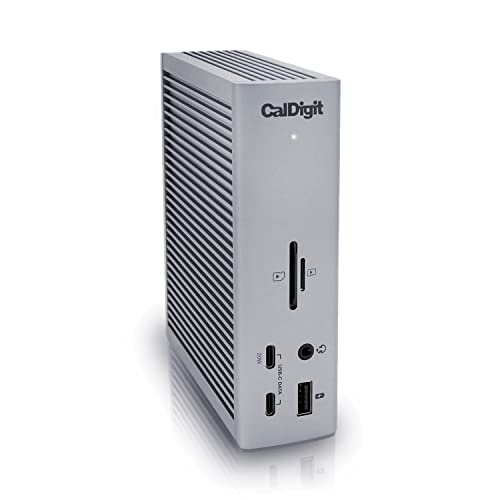
CalDigit TS4 Thunderbolt 4 Dock
| Spec | Detail |
|---|---|
| Brand | CalDigit |
| Model | TS4 |
| ASIN | B09GK8LBWS |
| Host connection | Thunderbolt 4, also listed for Thunderbolt 3, USB4 and USB-C hosts |
| Total ports | 18 ports as listed |
| Laptop charging | 98W charging as listed |
| Displays | Single 8K or dual 6K at 60Hz as listed, host dependent |
| Video | DisplayPort 1.4 connector and Thunderbolt 4 ports as listed |
| USB ports | 8 USB ports at 10Gb/s as listed |
| Network | 2.5 Gigabit Ethernet as listed |
| Extras | SD and microSD 4.0 UHS-II readers, 3 audio ports, security slot as listed |
The CalDigit TS4 is the high wattage, maximum ports pick. Its listing leads with 18 ports, 98W charging and 40Gb/s Thunderbolt 4, and it describes that power delivery as suited to larger screen laptops that require more power. If your laptop shipped with a high wattage adapter, this is the dock in the guide whose listed charging figure comes closest to replacing it with a single cable.
Display and data specs are equally broad and host dependent. The listing states Windows users can connect a single monitor up to 8K, macOS users a single display up to 6K at 60Hz, and dual support up to dual 4K at 60Hz on Windows, with higher dual results for certain Apple silicon models it names. It also lists three Thunderbolt 4 ports, eight USB ports at 10Gb/s, UHS-II readers and 2.5 Gigabit Ethernet. This dock suits a permanent desk with many devices. The listing notes a firmware update may be required and that maximum performance needs Thunderbolt 4 or fully optioned USB4, so confirm your port type first.
Targus Universal USB-C DV4K Docking Station DOCK310USZ

| Spec | Detail |
|---|---|
| Brand | Targus |
| Model | DOCK310USZ |
| ASIN | B08PMH27YL |
| Host connection | USB-C |
| Displays | Up to 2 monitors as listed |
| Video outputs | 2 HDMI ports |
| Display resolution | Dual monitors at 3840 by 2160 at p60 as listed |
| Laptop charging | 65W Power Delivery as listed |
| USB ports | 3 USB-A and 1 USB-C, USB 3.2 Gen 1 as listed |
| Extras | Ethernet and audio ports as listed |
The Targus DOCK310USZ is the universal hot-desk pick. Its listing describes support for a wide variety of laptop brands and operating systems, including Windows, macOS, Android, iOS and Chrome as listed, and it uses DisplayLink, which is why it can present a consistent dual-monitor desk across a mixed fleet. For a shared desk where a different laptop arrives each day, that breadth matters more than peak speed.
The core desk spec is simple and complete. Two HDMI 2.0 ports support two monitors at 3840 by 2160 at p60 as listed, 65W Power Delivery charges many everyday office laptops, and the mix of three USB-A ports and one USB-C port covers a keyboard, mouse and a couple of accessories. Ethernet and audio ports are included as listed, so calls and wired networking do not need separate adapters left at the desk.
At 65W, charging suits lighter laptops better than large workstations, and the port count is smaller than the TS4 or Anker 575. The listing also mentions a VESA bracket provision for holding the dock behind a display, with the bracket sold separately. Check its operating system and driver notes for your team laptops before standardising on it.
Frequently Asked Questions
Does a docking station charge my laptop automatically?
No. Only docks whose listings state power delivery charge the laptop, and only at the wattage listed. In this guide the Anker 575 lists 85W, the CalDigit TS4 lists 98W, the Targus lists 65W and the Plugable 11-in-1 lists 100W pass-through using your own charger, while the Plugable UD-6950H listing states it does not charge the laptop. Compare the figure with the wattage on your laptop adapter.
Will any USB-C laptop work with these docks?
Not always. Many docks require a USB-C port that supports DisplayPort Alt Mode, Thunderbolt or USB4 for video, and the listings state those requirements directly. DisplayLink docks such as the Plugable UD-6950H and Targus DOCK310USZ follow a different path and need the driver the listings describe. Check your laptop port specifications and the dock listing together before ordering.
Why do display limits differ between Windows and Mac?
The listings themselves give different display results by operating system. For example, the Anker 575 and Plugable 11-in-1 listings note mirrored behaviour or limits on Mac, while the CalDigit TS4 listing gives separate single and dual display figures for Windows and macOS. The dock hardware is only part of the result, so use the figure the listing gives for your operating system, not the largest number in the title.
What should a shared hot desk keep with the dock?
Keep the dock adapter, host cable, monitor cables, keyboard and mouse permanently attached. Add a spare charger if some laptops exceed the dock wattage, and label the host cable. Broad operating system support, as the Targus listing describes, reduces surprises at shared seats.
Product and ASIN Reference
| Product | ASIN |
|---|---|
| Plugable Universal Laptop Docking Station UD-6950H | B07CRSH25X |
| Anker 575 USB-C Docking Station 13-in-1 | B088F7SY6S |
| Plugable 11-in-1 USB-C Hub USBC-11IN1E | B0BQ1CQ3YR |
| CalDigit TS4 Thunderbolt 4 Dock | B09GK8LBWS |
| Targus Universal USB-C DV4K Docking Station DOCK310USZ | B08PMH27YL |