Key takeaways
- Compare the best desk speakers for offices and home workspaces, from compact USB powered pairs to bookshelf models with Bluetooth and multiple inputs.
Built-in laptop and monitor speakers are fine for system alerts, but they tend to sound thin during video calls, training videos, and background music. A dedicated set of desk speakers adds clearer voices, fuller sound, and a physical volume control that sits within reach all day. The good news is that a desk setup does not need much space: modern options range from palm-sized USB pairs to powered bookshelf speakers that anchor a larger workstation.
This guide compares five well-regarded desk speakers across the main buying shapes: a USB-C pair with Bluetooth, a multi-device Logitech set, a pair of powered studio monitors, a simple USB-powered budget pair, and a wooden bookshelf set with dual inputs. Each entry lists the specifications the manufacturer publishes, so the comparison stays grounded in connection types, power output, and driver sizes rather than vague impressions.
Whether the desk is a compact home office corner or a full dual-monitor workstation, one of these five options should fit the space, the computer, and the way the workday actually sounds.
As an Amazon Associate, we earn from qualifying purchases.
How to Choose Desk Speakers
Connection type comes first. USB speakers draw both power and audio from a single cable, which keeps a desk tidy and avoids hunting for a free outlet. Bluetooth models add wireless streaming from a phone or tablet, while 3.5 mm and RCA inputs suit older computers, monitors with audio-out jacks, and turntables or media players.
Power and driver size set the ceiling. Small USB pairs usually deliver a few watts and suit near-field listening at arm’s length. Powered bookshelf speakers and studio monitors plug into the wall and offer far more output, larger woofers, and stronger bass, at the cost of a bigger footprint on the desk.
Footprint matters more than people expect. Measure the space beside or beneath the monitor before ordering. Compact speakers can tuck under a raised display, while bookshelf models need roughly the depth of a paperback book on each side of the screen.
Controls and extras shape daily use. A front volume knob, a headphone jack for private listening, and tone controls for bass and treble all reduce friction during the workday. Dual inputs are worth having when a work laptop and a personal device share the same desk.
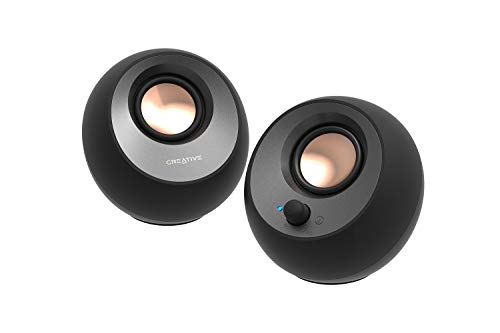
Creative Pebble V3
| Spec | Detail |
|---|---|
| Type | 2.0 USB-C desktop speakers |
| Power | 8W RMS, 16W peak |
| Drivers | 2.25-inch full-range, elevated at 45 degrees |
| Connectivity | USB-C audio and power, Bluetooth 5.0, 3.5 mm AUX-in |
| Key Feature | Clear Dialog audio processing and built-in gain switch |
| ASIN | B08F57GSJ7 |
The Creative Pebble V3 is built around a single-cable idea: one USB-C lead carries both audio and power from the computer, and a USB-C to USB-A converter is included for older machines. The spherical housings tilt their 2.25-inch full-range drivers upward at 45 degrees, aiming sound toward the listener’s ears instead of across the desk surface. Each speaker measures about 4.8 by 4.7 by 4.6 inches, so the pair fits comfortably under most monitor stands.
Creative rates the system at 8W RMS with 16W peak output, and a gain switch unlocks the amplified mode when the speakers are connected to a 10W USB-C or USB-A port. Clear Dialog processing is designed to lift spoken content in videos and calls without pushing overall volume higher. Bluetooth 5.0 covers wireless streaming from a phone, and the 3.5 mm input handles anything else, though the speakers still need USB power in those modes.
For a small desk that needs tidy cabling and clearer call audio, the Pebble V3 is the most streamlined option in this roundup. Its frequency response runs from 100 Hz to 17 kHz, so deep bass is limited by the compact enclosure, but voices and everyday media sit squarely in its comfort zone.
Logitech Z207

| Spec | Detail |
|---|---|
| Type | 2.0 stereo computer speakers |
| Power | 10W peak, 5W RMS |
| Connectivity | Bluetooth 4.2, 3.5 mm audio input |
| Key Feature | Logitech Easy-Switch for pairing two devices |
| Extras | Headphone jack, on-speaker controls |
| ASIN | B074KJ6JQW |
The Logitech Z207 focuses on device juggling, a common pattern in home offices where a work laptop and a personal phone or tablet share one desk. Its Easy-Switch technology pairs two devices at once and moves between them with a pause on one source and a play press on the other, so switching from a call laptop to phone music takes seconds rather than a re-pairing routine.
Each speaker houses an active driver plus a passive bass radiator, and Logitech rates the pair at 10 watts peak and 5 watts RMS. The front panel carries power and volume controls, a Bluetooth pairing button, and a headphone jack for private listening during open-plan hours or late work. Bluetooth range is listed at up to 20 meters line of sight, with a wired 3.5 mm input as the fallback for desktops without wireless.
The Z207 cabinet is slim and upright, which suits desks where width beside the monitor is tighter than depth. It runs from a standard power adapter rather than USB, so an outlet needs to be within reach, but in exchange the speakers stay independent of the computer’s USB power limits.
Edifier MR4
| Spec | Detail |
|---|---|
| Type | Powered studio monitor speakers (pair) |
| Power | 42W total, 21W plus 21W |
| Drivers | 4-inch woofer, 1-inch silk dome tweeter |
| Connectivity | Balanced TRS, RCA, and AUX inputs, headphone output |
| Key Feature | Monitor and music sound modes |
| ASIN | B09DKV849B |
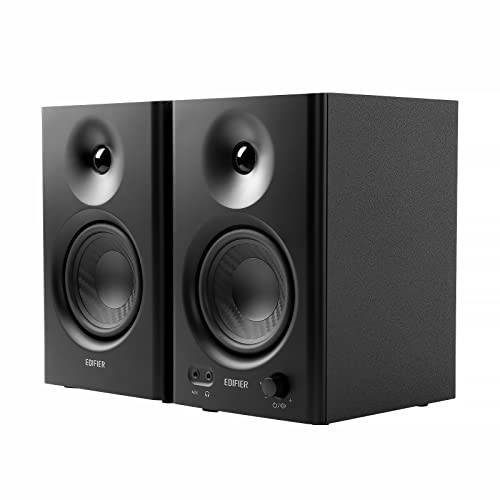
The Edifier MR4 is the step-up pick for desks that double as listening or content-creation stations. Each cabinet pairs a 4-inch low-frequency woofer with a 1-inch silk dome tweeter inside a wooden enclosure, and the system delivers 42 watts of total output. Edifier quotes a frequency response of 60 Hz to 20 kHz, which reaches noticeably lower than compact USB pairs manage.
Input flexibility is a strong point: balanced TRS connections suit audio interfaces, unbalanced RCA and front AUX inputs cover computers and phones, and a front headphone output allows silent monitoring. A multifunction knob on the active speaker handles volume, power, and switching between monitor mode, which aims for a flat reference response, and music mode, which adds a warmer tuning for everyday listening.
At roughly 5.5 inches wide and 9 inches tall per speaker, the MR4 pair needs a genuine bookshelf-sized footprint, so it fits larger desks and studio-style setups better than narrow workstations. For buyers who record, edit audio or video, or simply want the most detailed sound in this group, that space buys a clear upgrade.
Amazon Basics Stereo 2.0 Speakers

| Spec | Detail |
|---|---|
| Type | 2.0 USB-powered computer speakers |
| Power | 2.4W maximum output, USB 5V powered |
| Drivers | 2.8-inch |
| Connectivity | 3.5 mm aux input, USB for power |
| Key Feature | Front volume control knob with blue LED lighting |
| ASIN | B07DDGBL5T |
The Amazon Basics Stereo 2.0 set is the straightforward option: plug the USB cable into the computer for power, plug the 3.5 mm connector into the audio jack, and turn the knob. There is no software, no pairing sequence, and no separate power brick. The metal-finished cabinets measure about 3.9 by 2.6 by 2.9 inches each and weigh under a pound and a half as a pair, so they squeeze into the narrow gaps beside a monitor that larger speakers cannot use.
Output is rated at 2.4 watts maximum from the 2.8-inch drivers, with a published frequency range of 80 Hz to 20 kHz. That output level is aimed at near-field listening: calls, videos, and casual music at a desk rather than filling a whole room. A blue LED accent lights the base of each speaker while powered, and the volume knob doubles as the on and off control when the USB cable is disconnected.
For a shared office desk, a reception workstation, or a simple second computer that just needs sound better than a monitor’s built-in drivers, this set covers the essentials with the least possible setup. It is also an easy spare to keep in a drawer for hot-desk setups.
Edifier R1280T
| Spec | Detail |
|---|---|
| Type | Powered bookshelf speakers |
| Power | 42W RMS, 21W plus 21W |
| Drivers | 4-inch full-range, 13 mm silk dome tweeter |
| Connectivity | Dual RCA inputs |
| Key Feature | Bass and treble tone controls with remote |
| ASIN | B016P9HJIA |
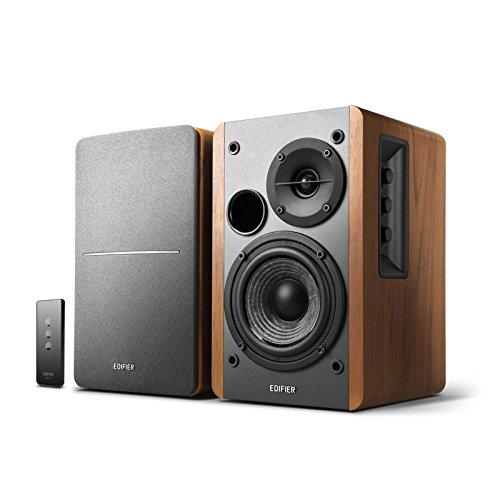
The Edifier R1280T brings a classic bookshelf design to the desk, with wooden enclosures, removable grilles, and a furniture-like finish that blends into a home office better than glossy plastic shells. Each speaker measures about 5.7 by 9.2 by 7.7 inches, and the pair is rated at 42 watts RMS with a frequency response of 60 Hz to 20 kHz.
Two RCA inputs allow two sources, such as a work computer and a turntable or a personal laptop, to stay connected at the same time without cable swapping. Side-panel controls on the active speaker adjust bass and treble by up to 6 dB in either direction alongside the main volume, and the included remote handles volume and mute from across the room, which helps when the speakers also serve a reading chair or meeting corner.
There is no Bluetooth on this model, so wireless streaming would need a separate receiver. In return, the R1280T offers the analog simplicity and tone shaping that many desk listeners prefer, plus enough output to cover a whole home office rather than just the chair in front of the screen.
Frequently Asked Questions
Do desk speakers need a separate power outlet?
It depends on the type. USB-powered models draw all their power from the computer, so they need no outlet at all. Powered bookshelf speakers and studio monitors, such as the Edifier models in this guide, plug into the wall and deliver higher output in exchange. Checking which kind a listing describes avoids surprises on setup day.
Can desk speakers connect to two devices at once?
Some can. The Logitech Z207 pairs with two Bluetooth devices and switches between them, and the Edifier R1280T accepts two wired sources through dual RCA inputs. Single-input USB speakers connect to one computer at a time, so frequent device swapping points toward a multi-input model.
Where should desk speakers be placed for the best sound?
Place one speaker on each side of the monitor, roughly an arm’s length apart, with the drivers aimed toward the listening position. Angled designs like the Creative Pebble V3 fire upward at 45 degrees to compensate for sitting below ear level. Keeping speakers on the desk surface rather than a shelf above or below the ears generally gives the clearest stereo image.
Are bigger desk speakers always better?
Not necessarily. Larger powered speakers offer more bass and volume, but they also consume desk space and can overwhelm a small room at close range. Compact USB pairs suit call-heavy work and tight desks, while bookshelf models earn their footprint when music listening, editing, or room-filling sound is part of the routine.
Product and ASIN Reference
| Product | ASIN |
|---|---|
| Creative Pebble V3 | B08F57GSJ7 |
| Logitech Z207 | B074KJ6JQW |
| Edifier MR4 | B09DKV849B |
| Amazon Basics Stereo 2.0 Speakers | B07DDGBL5T |
| Edifier R1280T | B016P9HJIA |