Our Short List of 3
All 4 Picks at a Glance
| Product | Specs | Action |
|---|---|---|
| 1. Lenovo IdeaPad Duet 5 Chromebook (82QS0000US) — ASIN: B09LP61KDP | Check price on Amazon | |
 2. ASUS Chromebook Flip CR1 — ASIN: B0DXBBBRJM | Check price on Amazon | |
 3. Acer Chromebook 315 — ASIN: B0DKP4QKCM | Check price on Amazon | |
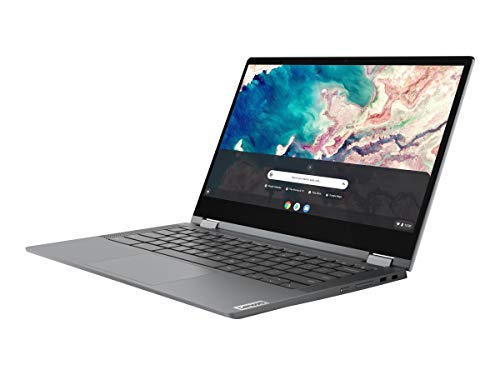 4. Lenovo Chromebook Flex 5 13-inch — ASIN: B086383HC7 | Check price on Amazon |
Key takeaways
- Chromebooks with genuinely long battery life compared: Lenovo IdeaPad Duet 5 up to 15 hours, ASUS Chromebook Flip CR1 up to 12 hours, Acer Chromebook 315 and Lenovo Flex 5 at 10 hours.
As an Amazon Associate we earn from qualifying purchases.
Affiliate Disclosure: This article contains affiliate links to products on Amazon. If you buy through those links, we may earn a commission from qualifying purchases at no additional cost to you. Battery life figures and specifications below are the manufacturers’ stated ratings taken from product listings and manufacturer materials, not results from detailed research by the author.
What “Long Battery Life” Actually Means on a Chromebook
Every Chromebook promises all-day battery life, so the phrase only becomes useful when you pin it to numbers and to how those numbers were produced. The figures in this guide are the manufacturers’ own stated ratings from their product listings: up to 15 hours for the Lenovo IdeaPad Duet 5 Chromebook, up to 12 hours for the ASUS Chromebook Flip CR1, and up to 10 hours for the Acer Chromebook 315 and the Lenovo Chromebook Flex 5. “Up to” is doing real work in those sentences. A rating is measured under the maker’s own test conditions — typically moderate screen brightness, web browsing or video playback, and a fresh battery — and your working day of video calls, dozens of tabs, and full brightness will return less. Treat the ratings as a way to compare machines against each other, not as a guarantee of the hours you will personally see.
Even discounted for real life, the gap between a 15-hour rating and a 10-hour rating matters. A machine rated at 10 hours that delivers seven or eight in your hands still finishes a school or office day. A machine rated at 15 hours that delivers eleven or twelve survives the day, the commute, and the evening — and it keeps a useful margin as the battery ages and its capacity slowly fades. Battery longevity is the second, quieter half of this topic: a Chromebook you can run for years on one battery is worth more than a slightly faster one you have to tether to a desk in year two. ChromeOS helps here, because it is a light operating system that sips power compared with a full desktop OS doing background work, which is why modest processors in this category still post long runtimes.
This guide only includes Chromebooks — laptops and detachables running ChromeOS. No Windows laptops, no tablets running a different operating system, and no accessories dressed up as picks. Four models make the list, each with a stated battery rating of at least 10 hours, and each suited to a recognisably different kind of user.
The Picks at a Glance
- Lenovo IdeaPad Duet 5 Chromebook (82QS0000US) — the battery life leader here, rated up to 15 hours, with an OLED touchscreen and a detachable keyboard.
- ASUS Chromebook Flip CR1 — rated up to 12 hours, in a ruggedised 11.6-inch convertible built for students and rough handling.
- Acer Chromebook 315 — a big 15.6-inch screen with a 10-hour rating, for people who want room to work more than they want portability.
- Lenovo Chromebook Flex 5 13-inch — a 10-hour convertible with a faster Intel Core i3 processor, for users who push their Chromebook harder.
1. Lenovo IdeaPad Duet 5 Chromebook (82QS0000US) — ASIN: B09LP61KDP
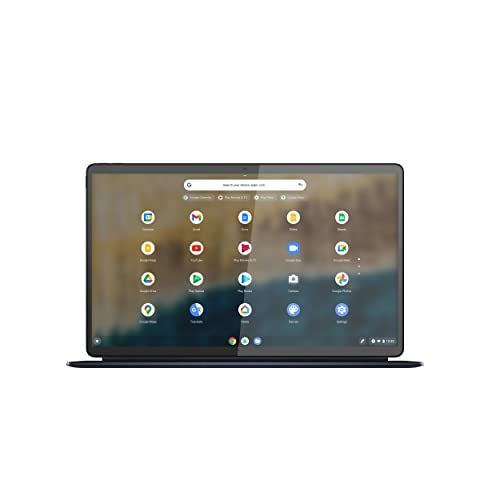
The IdeaPad Duet 5 Chromebook is the endurance pick in this roundup, and it gets there by design rather than by accident. It is a detachable 2-in-1: a 13.3-inch tablet with a fabric folio keyboard and a kickstand, powered by a Qualcomm Snapdragon SC7180 processor. ARM-based processors like this one are built around the same efficiency ideas as phone chips, and paired with a 42Wh battery, Lenovo rates the Duet 5 for up to 15 hours of battery life — the highest figure in this guide. The listing also describes rapid charging that returns the battery to 80 percent in about one hour, which changes how you use a long-life machine: a short top-up at lunch restores most of a day’s working capacity.
The display is the other headline. The 13.3-inch screen is an OLED panel with Full HD resolution and touch input, which means deeper blacks and better contrast than the LCD panels on the other picks here — genuinely nicer for reading, video, and evening use. The configuration in this listing carries 4GB of RAM and 64GB of storage, which is the honest limitation of the model: it is a browsing, documents, media, and light Android app machine, not a heavy multitasker. ChromeOS runs well within those limits for mainstream work, and the detachable format makes it the most portable full Chromebook in this guide — carry the tablet alone for reading and media, snap the keyboard on for writing.
Choose the Duet 5 if battery life is your first priority, if you travel or move around a building all day, or if you want one device that works as both a laptop and a tablet. Choose something else if you routinely keep very large numbers of tabs and apps open at once, or if you need a permanently attached full-size keyboard.
2. ASUS Chromebook Flip CR1 — ASIN: B0DXBBBRJM
The Flip CR1 is the durability-first pick, rated for up to 12 hours of battery life — the second-longest rating here — in an 11.6-inch convertible designed for classrooms and other places where laptops get knocked, dropped, and spilled on. ASUS describes it as built to the MIL-STD-810H military durability standard, with a ruggedised, water-resistant design and a 360-degree hinge that lets it work as a laptop, a tent, or a tablet. The listing’s configuration pairs an Intel Celeron N5100 processor with 4GB of RAM and a combined storage arrangement of 32GB of internal eMMC plus a 128GB SD card, for 160GB in total.
The 11.6-inch multitouch display keeps the whole machine small and light enough for a school bag, and the convertible hinge plus stylus support suit note-taking and markup work. ASUS also lists an 8MP world-facing camera alongside the regular webcam in this bundle, aimed at students photographing worksheets and whiteboards in tablet mode. The ChromeOS auto update expiration date given for this model is June 2031, which matters for a battery-life purchase: a machine bought for the long haul should keep receiving operating system and security updates for the long haul too, and a 2031 horizon comfortably covers a full school career stage or several years of home use.
Choose the Flip CR1 if the Chromebook is for a student, a child, or anyone whose laptop lives a hard life, and you still want a battery rating comfortably beyond a school day. The small screen and entry-level processor are the trade-offs: this is a machine for lessons, homework, browsing, and documents, not for large spreadsheets on an external monitor or heavy multitasking.
3. Acer Chromebook 315 — ASIN: B0DKP4QKCM
The Acer Chromebook 315 answers a different question: what if you want the long battery life but on a big screen, at a desk or kitchen table, rather than in a bag? Its 15.6-inch Full HD display is the largest in this guide, and Acer rates the machine for 10 hours of battery life from its 3-cell, 45Wh lithium polymer battery — a full working day unplugged, on a screen big enough for side-by-side documents and comfortable video calls. The configuration in this listing uses an Intel Celeron N4500 processor, 4GB of RAM, and a combined 128GB of storage made up of 64GB of internal eMMC plus a 64GB SD card bundled with the machine, along with Wi-Fi 6 and a webcam.
Acer markets the 315 as an all-day machine for classes and home working, with a boot time measured in seconds and a battery intended to get through a full day’s worth of work on a single charge. The larger chassis also leaves room for a roomier keyboard area than the compact picks here, which matters more than specifications suggest if you type for hours. The trade-off is portability: a 15.6-inch laptop is a bag-filler, and this is the pick for people whose Chromebook moves between rooms rather than between cities. The ChromeOS auto update expiration for this line is listed as June 2031, matching the long support horizon of the ASUS pick.
Choose the Chromebook 315 if you want the biggest screen in this guide, a full day’s stated battery life, and a straightforward home and student laptop. Choose one of the convertibles or the detachable if you need touch-first tablet use or genuine travel portability.
4. Lenovo Chromebook Flex 5 13-inch — ASIN: B086383HC7
The Flex 5 is the performance-leaning pick. Lenovo rates it for up to 10 hours of battery life — the same headline figure as the Acer 315 — but it earns its place differently: its Intel Core i3-10110U processor is a step up in responsiveness from the Celeron-class chips in the Acer and ASUS picks, which shows up when you run many tabs, larger web apps, or video calls alongside documents. The configuration in this listing has 4GB of RAM and 64GB of storage, a 13.3-inch Full HD touchscreen, and a 360-degree hinge that folds it into tent and tablet modes. Lenovo’s listing describes a 51Wh-class internal battery in the package contents, backlit keyboard, and battery life testing based on a power load test, with the usual note that results vary with settings and usage.
That combination — a stronger processor and a convertible touchscreen in a 13-inch body — makes the Flex 5 the most conventional “one laptop for everything” choice here. It is the pick most likely to satisfy someone replacing a Windows laptop for mainstream work who still wants a Chromebook that lasts the working day away from a socket. The honest caveats are age and appetite: this is an earlier-generation model than the other picks, so check the ChromeOS auto update expiration date on the specific listing before buying, and a faster processor under sustained load will use its battery more quickly than the Snapdragon in the Duet 5 — the 10-hour rating assumes the mixed, moderate use Chromebooks are built for.
Choose the Flex 5 if you want the strongest everyday performance in this guide in a convertible body and a 10-hour stated rating is enough for your routine. Choose the Duet 5 if maximum hours per charge matter more than processor headroom.
Buying Guide: Choosing a Chromebook by Battery Life
Start with the rating, then discount it. Use the manufacturer’s stated hours to rank machines, then assume your real figure will be lower, especially with video calls, high brightness, and many tabs. If your day is ten hours away from a socket, a machine rated at 10 hours is a risk and a machine rated at 12 to 15 hours is the sensible buy. That is the single most practical rule in this category.
Processor type shapes endurance. ARM-based processors such as the Snapdragon in the Duet 5 are designed for efficiency and underpin the longest ratings. Entry-level Intel Celeron chips are also frugal. A Core i3 gives you more speed and still posts a 10-hour rating in the Flex 5, but sustained heavy work will drain it faster. Match the chip to the workload: browsing and documents favour efficiency; heavy web apps favour the i3.
Screen size is a battery and portability trade. The 15.6-inch Acer gives you workspace and still claims a full day; the 11.6-inch ASUS and the detachable Lenovo give you portability and, in the Lenovo’s case, the best endurance figure here. Decide whether the machine lives on a desk or in a bag before you decide anything else.
Check the auto update expiration date. A long-battery Chromebook is a long-term purchase, and ChromeOS updates are what keep it secure and compatible. The listings for the ASUS Flip CR1 and Acer Chromebook 315 lines state June 2031; check the date on any specific listing, especially for earlier-generation models like the Flex 5, and avoid any machine whose update horizon is close.
Storage bundles need a careful read. Two of the picks here reach their headline storage figure by bundling an SD card with smaller internal storage. Internal storage is where ChromeOS and your apps live; the card is fine for downloads and media. That arrangement is legitimate and disclosed in the listings, but compare internal storage figures, not just totals, when you choose between models.
Charging speed is part of battery life in practice. The Duet 5’s rapid charge — 80 percent in about an hour, per Lenovo — means a short plug-in restores most of a day. If your routine includes a predictable lunch break near a socket, fast charging can matter as much as the headline hours.
Frequently Asked Questions
How many hours do I actually need? For a school or office day with a socket available at lunch, a 10-hour rating is usually enough. For travel days, conferences, fieldwork, or any routine with no reliable charging, choose a rating of 12 hours or more so the real-world figure still clears your day.
Do battery ratings drop over time? Yes. All lithium batteries lose capacity with charge cycles and age. Buying more rated hours than you need today is the simplest hedge, because a machine that starts at 15 rated hours still serves a full day after its battery has faded, while a machine that starts at exactly your requirement will fall short.
Is a detachable like the Duet 5 a real laptop? For ChromeOS work — browsing, documents, email, video calls, Android apps, and media — yes, with its keyboard attached it behaves as a laptop, and detached it is a large tablet. Its limits are the 4GB of RAM and 64GB of storage in this configuration, not the form factor.
Can I replace the battery later? The batteries in these Chromebooks are internal and not user-replaceable in normal use. That is another reason to buy endurance headroom up front and to check the update expiration date, so the machine’s supported life and its battery life run out at roughly the same time rather than years apart.
Bottom Line
If battery life is the whole point, the Lenovo IdeaPad Duet 5 Chromebook is the pick: a stated 15 hours, rapid charging, an OLED screen, and a detachable design that travels well. The ASUS Chromebook Flip CR1 is the one to buy for students and rough handling, with 12 stated hours and a rugged build. The Acer Chromebook 315 gives you the big 15.6-inch screen with a full-day 10-hour rating for home and desk use, and the Lenovo Chromebook Flex 5 trades some endurance headroom for a faster Core i3 in a convertible body. Pick by your day first — how many hours, away from which sockets, carrying how much screen — and the right machine from these four follows from that.