Key takeaways
- Compare five desk laptop sleeves for office workers, from a 13 inch tomtoc to 15.6 inch covers, with sizes, pockets, and padding from the listings.
The real decision with a desk laptop sleeve is not color or branding. It is whether the sleeve fits your exact machine closely enough to protect it, while still sliding in and out of your bag or desk drawer dozens of times a week without a fight. A sleeve that is too loose lets the laptop shift and bang its corners; one that is too tight turns every meeting-room trip into a wrestling match with a zipper.
This guide is for office and desk workers who carry a laptop between a home desk, a shared workspace, and meeting rooms during the day. The five sleeves below were picked from the product names and specifications on their Amazon pages, and they cover the sizes most office machines come in, from compact 13 inch ultrabooks to full 15.6 inch notebooks.
Quick Picks
As an Amazon Associate we earn from qualifying purchases
| Product | Best for | Key spec from title |
|---|---|---|
| tomtoc 360° Protective Laptop Sleeve | 13 inch MacBook and XPS users who want corner protection | 13-inch, water-resistant, CornerArmor design |
| MOSISO 360 Protective Laptop Case 13.3 inch | Carrying a charger and mouse along with the laptop | 13-13.3 inch, 2 pockets, handle and trolley belt |
| ampoock Laptop Sleeve Case 14 inch | 14 inch laptop owners who need an accessory pocket | 14 inch, shockproof cover with accessory pocket |
| Hsmienk Laptop Case Sleeve 15.6 inch | 15.6 inch notebooks that live in a tote or backpack | 15.6 inch, shockproof, internal 15.3 x 10.9 inches |
| CDBXPRG Laptop Case Sleeve 15.6 inch | 15 inch Windows laptops from HP, Dell, and Lenovo | 15-16 inch, interior 14.76 x 10.43 x 0.98 inch |
How to Choose
Match the internal dimensions, not the screen size on the box
Screen size is a diagonal measurement, and two laptops with the same screen size can have very different body dimensions. A slim 13 inch ultrabook and a chunkier 13 inch convertible may differ by half an inch in width. The listings in this guide state internal dimensions for exactly this reason: the tomtoc sleeve, for example, lists an interior of 11.97 x 8.46 x 0.61 inches. Measure your laptop’s length, width, and thickness, then compare those three numbers against the interior figures on the product page before anything else.
Decide how much padding your routine actually needs
Padding needs depend on how the laptop travels. If the sleeve goes inside a padded backpack and only crosses the office, a thin neoprene or quilted sleeve is usually enough. If the laptop rides loose in a tote, gets stacked under notebooks, or travels between floors and buildings, look for reinforced edges and shockproof construction. The tomtoc uses its CornerArmor design with high resilience edges, while the 15.6 inch sleeves here describe shockproof protective shells. More padding adds bulk, so balance protection against how tight your bag already is.
Count the pockets against what you carry every day
A bare sleeve protects the laptop and nothing else, which is fine if your charger lives at your desk. If your power adapter, mouse, and cables travel with you, a front pocket changes the sleeve from a cover into a small carrying system. The MOSISO case adds two separate front organizer pockets plus a handle and a trolley belt, and the tomtoc includes a front pocket sized 9.45 x 7.68 inches for a mouse, drives, or a power supply. Check pocket dimensions, because a pocket that fits a mouse may not fit a bulky charger brick.
Check the closure and carry options for your commute pattern
Most desk sleeves close with a zipper, and the quality of that zipper decides how the sleeve ages. The tomtoc listing specifies a YKK zipper, and the MOSISO uses double zippers that can open from either side. If you carry the sleeve on its own rather than inside another bag, a handle matters: the MOSISO includes a portable handle and a back trolley belt for sliding over a suitcase handle. Workers who only move between desks on one floor can skip handles entirely and choose the slimmest profile instead.
The 5 Best Options
tomtoc 360° Protective Laptop Sleeve for 13-inch MacBook Air and Pro
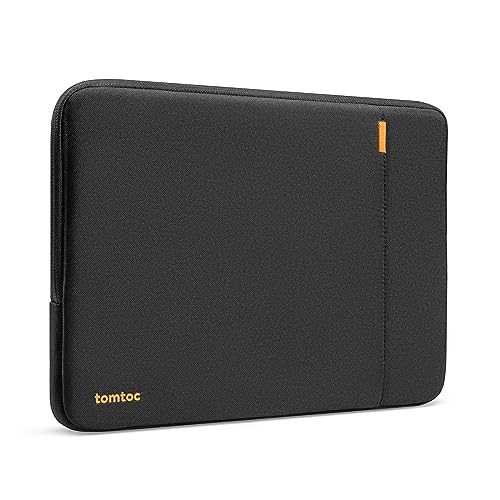
This sleeve suits MacBook Air and Pro owners, plus Dell XPS 13 users, who want protection focused on the corners, where drops usually land. The listing highlights the CornerArmor design, high-density soft padding, and a water-resistant recycled polyester shell, with an extra front pocket for a mouse, cables, or the power supply. At 8.48 ounces it adds little weight to a bag, and the 12-month warranty stated on the page is longer than most sleeves in this group offer.
Specs
- Fits 13-inch MacBook Air M5/M4/M3/M2/M1 and MacBook Pro M2/M1
- Also listed for Dell XPS 13 and 12.3 to 13 inch Surface Pro models
- Internal dimensions: 11.97 x 8.46 x 0.61 inches
- External dimensions: 13.39 x 9.65 x 1.57 inches
- Front pocket: 9.45 x 7.68 inches
- Enclosure material: recycled polyester, water resistant
- YKK zipper, CornerArmor corner protection, model A13-C02D
- Item weight: 8.48 ounces; warranty: 12 months
Best for: 13 inch MacBook and XPS owners who carry the laptop loose in a tote or messenger bag.
Watch out for: the interior is only 0.61 inches deep, so a laptop in a hard shell case of its own may not fit.
ASIN: B01N590YOT
MOSISO 360 Protective Laptop Case 13.3 inch, Square Quilted

The MOSISO case fits workers whose sleeve doubles as their whole carrying setup between desks. Beyond the main compartment for 13 to 13.3 inch laptops, it adds two separate front organizer pockets for a mouse, earphones, pens, and notepads, a portable handle, and a back trolley belt for travel days. The square quilted polyester body uses reinforced interior edges for what the listing calls 360 degree protection, and double zippers let you open it from either direction on a crowded desk.
Specs
- Fits 13 to 13.3 inch laptops, including MacBook Air and Pro 13 and Pro 14
- Also listed for HP, Dell, ASUS, and Lenovo models in that size range
- Material: polyester, square quilted design
- Two front separate organizer pockets
- Portable handle and back trolley suitcase belt
- Double zippers, reinforced interior edges
- Standing screen display size: 13.3 inches
- Item weight: 11.7 ounces; color shown: Chalk Pink
Best for: desk workers who carry charger, mouse, and notepad together and want one grab-and-go case.
Watch out for: at 11.7 ounces plus accessories, it is closer to a slim briefcase than a minimalist sleeve inside a backpack.
ASIN: B0BS1GVTHC
ampoock Laptop Sleeve Case 14 inch, Shockproof Protective Cover

Fourteen inch laptops sit in an awkward gap: too big for most 13 inch sleeves, swimming in 15.6 inch ones. This ampoock cover is sized for that middle group, with a shockproof protective body and an accessory pocket for the extras that follow a laptop around an office. The brand describes pockets holding mice, headphones, pens, phones, cables, and storage cards, which makes it a practical pick for hot-desk workers who cannot leave accessories parked at one workstation all week.
Specs
- Sized for 14 inch laptops
- Listed for 14 inch MacBook, HP, Dell, Lenovo, and Acer models
- Shockproof protective cover design
- Accessory pocket for mouse, cables, pens, and phone
- Briefcase-style carrying format
- Brand: ampoock
Best for: 14 inch laptop owners in shared-desk offices who move their full kit several times a day.
Watch out for: the listing gives fewer published interior dimensions than the other picks, so compare your laptop’s measurements carefully against the size guidance on the page.
ASIN: B0CLGXK7MR
Hsmienk Laptop Case Sleeve 15.6 inch, Shockproof with Accessory Pocket

Owners of 15.6 inch notebooks from HP, ASUS, Dell, Lenovo, and Acer get a sleeve shaped for those larger bodies instead of a stretched small one. The listing states external dimensions of 15.7 x 1 x 11.2 inches and an internal space of 15.3 x 0.8 x 10.9 inches, which gives a clear fit check before ordering. Shockproof construction and an accessory pocket round it out for workers who carry the big laptop between a desk, a locker, and a meeting room.
Specs
- Fits 15.6 inch laptops from HP, ASUS, Dell, Lenovo, and Acer
- External dimensions: 15.7 x 1 x 11.2 inches
- Internal dimensions: 15.3 x 0.8 x 10.9 inches
- Shockproof protective notebook case
- Accessory pocket included
- Model number: loo-1008
Best for: 15.6 inch laptop owners who want a slim protective layer inside a backpack or tote.
Watch out for: the internal depth is 0.8 inches, so thicker gaming or workstation laptops should be measured before buying.
ASIN: B09Y3J6FGT
CDBXPRG Laptop Case Sleeve 15.6 inch, Shockproof Computer Cover

This CDBXPRG cover targets the mainstream 15 inch Windows fleet found in most offices: HP Pavilion and Envy 15, Dell Inspiron and Latitude 15, Lenovo IdeaPad 15, Acer Aspire 15, and ASUS ZenBook models are all named on the listing. It is a shockproof sleeve with a stated interior of 14.76 x 10.43 x 0.98 inches, slightly deeper than the Hsmienk above, which can help owners of thicker business notebooks who still want a sleeve rather than a full laptop bag.
Specs
- Fits 15 to 16 inch laptops, including HP Pavilion and Envy 15
- Also listed for Dell Inspiron and Latitude 15, Lenovo IdeaPad 15, Acer Aspire 15, ASUS ZenBook
- Item dimensions: 15.5 x 11.4 x 1.57 inches
- Interior size: 14.76 x 10.43 x 0.98 inches
- Shockproof computer cover design
- Brand: CDBXPRG
Best for: office workers with thicker 15 inch Windows laptops that feel tight in shallower sleeves.
Watch out for: it is one of the bulkier options here at 1.57 inches thick overall, so check your bag’s laptop compartment before ordering.
ASIN: B0CZ7YZ1QP
Which One Fits Your Situation
You move between a home desk and an office desk daily
Pick the MOSISO 13.3 inch case if your machine is in that size range. Its two organizer pockets swallow the charger and mouse that hybrid workers otherwise juggle loose, the handle makes the walk from car to desk simple, and the trolley belt helps on travel days. It replaces a separate accessory pouch entirely.
Your laptop lives inside a backpack or tote
Choose the slimmest sleeve that fits your size: the tomtoc for 13 inch machines or the Hsmienk for 15.6 inch ones. Both focus on padding and a close fit rather than handles and pockets, so they slide into a bag’s laptop compartment without snagging, and the laptop stays protected when the bag is set down hard.
You hot-desk and carry everything with you
The ampoock 14 inch sleeve fits this routine when your laptop is a 14 inch model. Its accessory pocket keeps the mouse, cables, and pens with the machine, so setting up at a new desk takes one trip. Workers with 15 inch laptops in the same routine should look at the CDBXPRG instead.
Your laptop is a thick 15 inch Windows workstation
Go with the CDBXPRG cover. Its interior depth of 0.98 inches is the most generous in this group, and the listing names the common business models it fits, from Latitude and Inspiron to IdeaPad and Pavilion. Measure your machine’s thickness first, including any protruding battery or dock connector, because even this sleeve has limits.
Common Mistakes
- Buying by screen size alone instead of comparing the laptop’s body measurements with the sleeve’s stated internal dimensions.
- Choosing a sleeve so tight that the zipper teeth scrape the laptop’s corners every time it goes in or out.
- Assuming a pocket fits a charger brick without checking the pocket dimensions on the listing.
- Picking a handled briefcase-style case when the sleeve will only ever ride inside a backpack, adding bulk for nothing.
- Ignoring thickness: slim sleeves around 0.6 inches deep will not close over a laptop wearing its own hard shell cover.
Frequently Asked Questions
How much room should a laptop sleeve have around the laptop?
A close fit with a small margin works best. The laptop should slide in without forcing the zipper, and it should not shift noticeably when the sleeve is tilted. Compare your laptop’s three measurements with the internal dimensions on the listing, and treat thickness as the measurement most people forget to check.
Can a 13.3 inch laptop use a sleeve listed for 13 inches?
Sometimes, but the label alone does not settle it. Some 13 inch sleeves, like the tomtoc in this guide, list an interior that suits slimmer 13 inch machines, while the MOSISO is built for the 13 to 13.3 inch range. Match the interior dimensions to your exact model rather than relying on the headline size.
Is a sleeve enough protection on its own?
A padded sleeve handles scratches, light bumps, and corner knocks during desk-to-desk moves, especially designs with reinforced edges. It is not a substitute for a structured bag on a rough commute. If the laptop travels loose in a tote, choose one of the shockproof or corner-reinforced options rather than the thinnest cover.
Should office workers choose a sleeve with a handle?
Only if the sleeve regularly travels on its own. A handle and trolley belt, like those on the MOSISO case, help when you carry the laptop between buildings or through an airport. If the sleeve stays inside a backpack, a handle adds bulk and can catch on the bag’s compartment.