
Key takeaways
- Manual crank desks. No motor to fail and no outlet needed, but slower and less convenient.
- Desktop riser on your existing desk. The lowest-cost route to sit-stand. SHW lists a 36 by 24 inch riser that adjusts from 4 to 16 inches with a 30 lb maximum.
- Wait and save for a dual-motor desk. If you will keep the desk for years, a sturdier model may be the better long-term choice.
If you want a motorized sit-stand desk and your ceiling is $150, the practical answer is a compact electric desk from a value maker such as SHW, Cubiker or HUANUO, or an electric frame-only base if you already own a tabletop; buyers who need two monitors or maximum steadiness should plan to step up to a dual-motor model from a maker such as FlexiSpot. This guide focuses on what the motor, controller and frame actually do, so you can judge a budget electric desk by its specifications rather than its photos.
Our top picks


As an Amazon Associate we earn from qualifying purchases at no extra cost to you.
How electric desks differ from manual and riser options
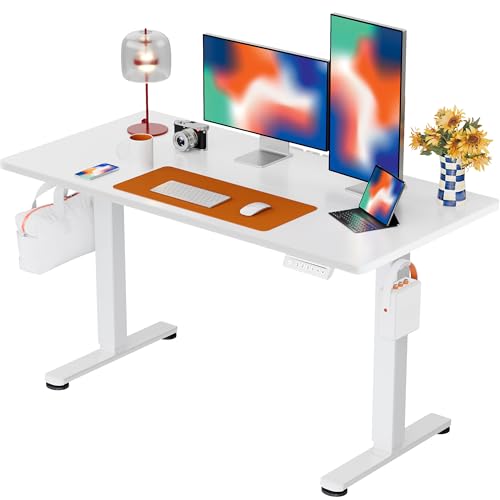
An electric desk has a motor in each lift column (or a single motor driving both legs), a control box, and a handset with up and down buttons. Compared with a hand-crank desk it changes height in seconds, and compared with a desktop riser it lifts the entire work surface, so you keep full desk space at either height. The price of that convenience is a power connection, more parts that can fail, and a weight limit set by the motor.
At the low end of the market, roundup sites that review budget standing desks commonly name brands such as SHW, VIVO, Cubiker and HUANUO. Those lists are mostly affiliate-driven, so treat the ranking as a starting point. A common pattern is that cheaper desks use 2-stage legs and smaller tops, and a few steps up you get dual motors and steadier tops.
At a glance
| Model or type | Best for | Key stated specs | Limits |
|---|---|---|---|
| SHW electric desk, 48 or 55 inch | Cheapest full electric desk | For the 55 x 28 inch model SHW lists a fully motorized lift from 28 to 45 inches (some listings say 46), two motors and about 110 lb capacity | Specs differ by size and listing |
| VIVO electric frame | People with their own desktop | VIVO sells single-motor and dual-motor frames, with listed capacities of about 176 to 220 lb; dual-motor frames cost more | Top not included |
| Cubiker 48 x 24 | Compact rooms | Listings give a lift range of roughly 27 to 45.5 inches and 2 or 3 memory presets depending on the variant | Smaller top, specs vary by listing |
| HUANUO 32 x 19 | Very small spaces | Listings give a height range of about 28.3 to 46.5 inches and a capacity of 154 or 176 lb | Very small top; listings differ |
| FlexiSpot EN1 | Slightly larger budget | Maker lists single motor, 2-stage legs, 154 lb lift capacity excluding the top, 1 inch per second, 3 presets, under 50 dB, 5-year warranty on frame and motor | May exceed the cap depending on size; some retailers list the EN1 as discontinued as FlexiSpot moves to newer models |
| Dual-motor desks (FlexiSpot and others) | Two monitors, steadier at height | Dual-motor designs with higher listed capacities | Above this cap |
The specs that decide whether the desk is good
Motor configuration
Single-motor desks drive both legs through one motor and a linking rod. They are generally cheaper but have a lower load rating. FlexiSpot’s EN1 is an example: the maker lists a single motor, 2-stage legs and 154 lb of lift capacity excluding the desktop. Dual-motor desks give each leg its own motor, which reviewers commonly link to smoother lifting and better load handling. If your setup is a laptop and one monitor, single is fine. If it includes a heavy monitor arm, a speaker or a PC tower, step up.
Lift range and speed
The lift range tells you whether you can sit and stand comfortably. Many budget desks start near 28 inches and finish at around 45 to 48 inches. FlexiSpot lists the EN1 at 1 inch per second, and VIVO lists similar speeds for some frames. Taller buyers should compare the maximum height with their standing elbow height, since a desk that tops out too low will push you into a stoop.
Controller and memory presets
Budget desks usually offer simple up and down buttons, with some adding three memory presets. FlexiSpot’s EN1 lists three presets. Presets are helpful if you share a desk, and optional if you change height by feel.
Safety and certification
Electric desks plug into the mains, so look for a stated certification and follow the manual. For any brand, look for the same information on the product page and in the manual, and do not assume it is there. Some makers describe anti-collision or overload protection; count it only if the maker lists it for your exact model. Use the supplied power cord, do not use a damaged cord, avoid covering the control box, and ask a qualified electrician if your outlet or wiring is in doubt.
Warranty
The EN1’s listed warranty is 5 years on the frame and motor, and 2 years on the controller and electronics. Cheaper models often carry shorter terms, so read the policy before you buy and keep proof of purchase.
Fit, size and setup
Measure the space and the clearance under the desk. A 48-inch desktop leaves room for a monitor and laptop. A 55 to 60 inch desktop gives space for two screens. Depth should be at least 24 inches, and 28 to 30 inches is more comfortable for monitor distance. FlexiSpot’s EN1 listings have shown 48 x 30, 55 x 28 and 60 x 30 inch sizes, though listings differ and availability may change.
Assembly typically takes under an hour with two people, because the legs and desktop are heavy. Level the desk with the adjustable feet before you load it, and leave slack in monitor and power cables so a rising desk does not pull them tight. Keep children and pets clear while the desk moves, and never sit or stand on the desktop.
Pick X if…
| If you… | Pick | Reason |
|---|---|---|
| Need the lowest-cost electric desk | SHW 48-inch or 55-inch | Full motorized lift in a complete package |
| Already have a tabletop | VIVO electric frame | Pay only for the lift mechanism |
| Work with one monitor in a small room | Cubiker 48 x 24 or HUANUO 32 x 19 | Compact footprint |
| Want presets and a longer warranty | FlexiSpot EN1 | Three presets and a 5-year frame and motor warranty per the maker |
| Mount two monitors or a heavy arm | A dual-motor desk | Higher listed capacity, though above this cap |
Alternatives
- Manual crank desks. No motor to fail and no outlet needed, but slower and less convenient.
- Desktop riser on your existing desk. The lowest-cost route to sit-stand. SHW lists a 36 by 24 inch riser that adjusts from 4 to 16 inches with a 30 lb maximum.
- Wait and save for a dual-motor desk. If you will keep the desk for years, a sturdier model may be the better long-term choice.
Care and troubleshooting
Re-tighten frame bolts every few months. Keep chair casters, bins and cables out of the legs’ path. If the desk lifts unevenly, stops, or makes grinding sounds, follow the manual’s reset steps, and contact the maker if it persists. Do not open the control box yourself. Wipe the surface with a damp cloth and avoid harsh solvents.
Budget tiers and what changes between them
At the cheapest tier you are looking at single-motor desks with small tops, basic handsets and shorter warranties. In a mid-range tier, makers such as FlexiSpot list features like three presets, a quiet motor and longer coverage, and dual-motor models add steadiness. A premium tier brings more motors, wider lift ranges, heavier loads and refined controls. The cap in the title sits at the very bottom of this ladder, which is why the practical advice is to buy the smallest sturdy desk that fits your gear, rather than the largest top you can find.
Think about the total setup, too. A desk is only part of the standing workflow, and many people also want an anti-fatigue mat, a monitor arm or a cable tray. Budget for those as separate items, and start with the desk first, since the rest can be added later.
Frequently Asked Questions
Is a single-motor electric desk good enough?
For a laptop or one monitor, yes. Lighter-duty desks have lower load ratings, and the EN1’s listed 154 lb excludes the desktop. If you plan to mount two large monitors or add a heavy PC, consider a dual-motor desk.
Do electric standing desks use much power?
They draw power mainly while moving and stay in a low-power standby otherwise. Exact figures vary by model, so check the maker’s manual. Plug the desk straight into a wall outlet rather than a crowded strip.
Are cheap electric desks safe?
Look for a stated certification and follow the manual. You should expect any brand to state its certifications and follow the manual. Stop using a desk with damaged cords or odd noises and contact the maker or a qualified electrician.
How do I stop a standing desk from wobbling?
Level the feet, avoid extending to full height unless needed, tighten the bolts, and keep the load modest. Reviewers link wider bases and dual motors to steadier desks.
What lift range should I look for?
A low point near 28 inches and a high point of 45 inches or more suits many people. Compare the range with your own sitting and standing elbow heights. Note that listed ranges can differ between pages for the same model.
Can I add my own desktop to an electric frame?
Yes, if the frame’s width range and mounting pattern fit the top. Check the maker’s stated width adjustment and the maximum desktop size. Use a solid, flat top and pre-drill the screw holes.


